Skydive in Sydney

I always wanted to do skydive one day. It was my birthday and when I open the gift envelop from my wife I saw a skydive voucher. I was surprised and got cold feet. Then I decided to do it. So I booked myself and here’s my experience.

We  drove to Skydive check-in office at Wollongong, NSW. I didn’t know what to expect. When I  arrived there, there were lot of skydive students like me. In the registration counter I saw a whole family registering to do skydive. After I registered and checked my weight, I did a 15minute Tandem skydive crash course. I then dressed and put on my skydive gears and anxiously waiting for the bus to take us to the airport. When the bus arrived, I was introduced to my tandem instructor.  There were 8 students and 8 tandem instructors. We all got into the bus for 14,000 feet skydive jump. Here’s my skydive video. Enjoy!

For more information see,

www.skydivethebeach.com.au
My wife bought the voucher from Adrenalin.com
See Skydivethebeach’s YouTube videos.
Follow Skydivethebeach on Twitter.
See Skydivethebeach on Facebook.

Tagged with:
Posted in Amazing experiences

Things you should know about Scrum

After the above 10 minutes video introduction from @hamids, lets find the roots of Scrum first. The first Scrum team was created directly from a paper which is required reading for any Scrum practitioner. Read Roots of Scrum: Takeuchi and Self-Organizing Teams for more details.

Scrum principles

  1. Small working teams ( @richardbanks suggest 7+-2 team members).
  2. Embrace changing requirements.
  3. Deliver finish product frequently in Small batches – Continuous Deployment.
  4. Enable releasing product whenever required – Continuous Delivery.

Characteristics of Scrum

  1. Activity are time boxed.
  2. All project metrics, reports, and details are prominently displayed. Project status is displayed on a white board with post-it.
  3. Multi-disciplinary and self-organizing team. Team make the decisions themself.
  4. No specific engineering practices prescribed.
  5. Rather then counting man hours scrum team do product progression in a series of sprints(Time box iteration).
  6. Requirements are captured as items in a product backlog. (Master list of all work the team will do).
  7. Continuously tested as the software is created.(This help in continuous delivery)

Now, lets watch what @kschwaber has to say about Scrum.

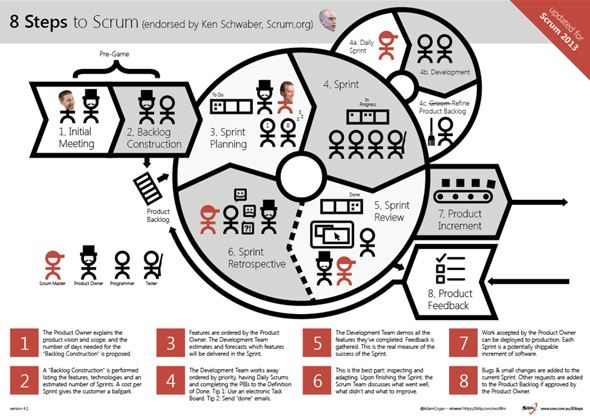
@adamcogan has complied The 8 Steps to Scrum PDF, endorsed by @kschwaber. Print and stick it on your wall.

8Steps to Scrum 2013

8Steps to Scrum 2013

In Scrum you have following Scrum ceremonies (meetings). Following are some points on what you do in each of the following ceremonies.

  • Sprint planning meeting.
  1. Create sprint goals (high level objectives).
  2. Product owner, scrum master, team members (developers) attend these meetings.
  3. Ideally starts on Monday after the last sprint.
  4. Team members select items from the product backlog.
  5. Discuss the fine details of implementation.
  • The daily scrum(daily stand up 15min).
  1. Team members answer the following questions,
    • What did you do yesterday?
    • What will you do today?
    • What are the impediments in your way?
  • The sprint review.
  1. Show new features or demonstrate the software.
  2. Do not spend more than 2 hours of preparation. Don’t show slides, just show code.
  3. Invite everybody who is interested.
  4. Ask for feedback.
  • The sprint retrospective.
  1. This is the Kaizen part (continuous improvement).
  2. Discuss what is and what  isn’t working.
  3. Typically spend 15-30 minutes.
  4. This meeting is done after every sprint review.
  5. Whole team participates, possibly customers and others.
  6. Ask following questions for next sprint,
    • What will we start doing?
    • What will we stop doing?
    • What will we continue doing?

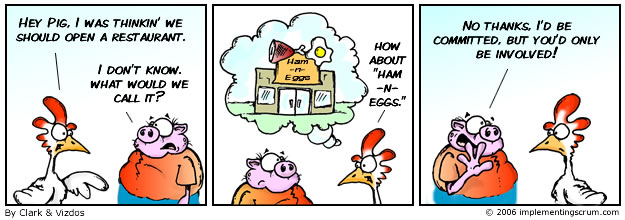
The Classic Story of the Pig and Chicken

The Classic Story of the Pig and Chicken

The Classic Story of the Pig and Chicken

Above figure: It is key to the success of Scrum to know who the pigs are and who the chickens are. View a translated version here — now available in 10+ other languages!

Read Do you know that working in a Team is better than on your own?

Read Ways To Learn About Scrum on scrum.org.

Download and read the Scrum Guide from scrum.org (16 page PDF on 23Dec2011).

Read Rules to Better Scrum using TFS on ssw.com.au (big blog).

Read Done – Do you go beyond ‘Done’ and follow a ‘Definition of Done’? and Definition of Done.

Take the Scrum Open assessment. If you are a developer like me, then attend the Professional Scrum Developer .NET course and then you could do the Professional Scrum Developer Assessments. Also see The Professional Scrum Developer from scrum.org.

After you pass the exam with flying colours,  it’s time to implement Scrum in your team. Read and use the Contracts for Implementing Scrum.

If you want to support a software development team’s efficiency, effectiveness, and continual improvement look at The Professional Scrum Master on scrum.org.

Feel free to suggest other tops I may have missed in the comments! Enjoy!

Related links,

Microsoft’s Process Templates and Tools

Do you use printed ‘SSW Story Cards’ with your customers in the Spec Review?

Professional Scrum Developer Course – New Delhi Day 1

Agile team practice fundamentals

Essential scrum master interview questions

Books,

Enterprise Scrum Ken Schwaber

Agile Project Management Microsoft Professional

Tagged with: , , , ,
Posted in Scrum

Increase your website performance by minification of JavaScript and CSS in one click (F6)

There are many ways to achieve JavaScript and CSS minification. In an ASP.NET MVC project I have successfully set up one click(F6) minification of JavaScript and CSS files using YUI Compressor .NET and MSBuild in VS2010. This minification has reduce the JS and CSS file size to 50% less, which in turn increases the application’s performance. I thought I will share my experience.

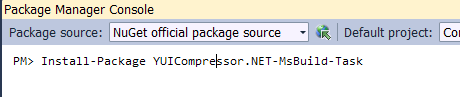
I started by installing the YUICompressor .NET (MsBuild Task) package from Nuget gallary in my VS2010 web project.

YUICompressor .NET (MsBuild Task)

YUICompressor .NET (MsBuild Task)

Download the Sample WebSite using Post-Build events. Copy the MSBuild folder to your project root.

Open MSBuildSettings.xml (inside the MSBuild folder in your project) and modify the element UsingTask‘s attribute AssemblyFile to AssemblyFile="(root folder for your solution)\packages\YUICompressor.NET-MsBuild-Task.1.6.0.1\lib\NET35\Yahoo.Yui.Compressor.MsBuildTask.dll". Also modify the path and the final file name for CSS and JS output. Click the image below to see the code.

MSBuildSettings Using Task

MSBuildSettings Using Task

Now in the MSBuildSettings.xml file include all the JavaScript and CSS files under element ItemGroup as shown in the image below,

MSBuildSettings Item Group

MSBuildSettings Item Group

Finally, modify the web project Build settings. Please take note of
/p:CssOutputFile
/p:JavaScriptOutputFile
$(TargetDir) <– you might wish to change this if you have another destination directory.

VS2010 Build Events

VS2010 Build Events

You can copy the post-build event script from below,

$(MSBuildBinPath)\msbuild.exe "$(ProjectDir)MSBuild\MSBuildSettings.xml" /p:CssOutputFile="$(TargetDir)..\Content\themes\MyProject\MyProject.min.css" /p:JavaScriptOutputFile="$(TargetDir)..\Scripts\MyProject\MyProject.min.js"

Now, every time you build (or hit F6) in Visual Studio 2010, your project will create (if output JS or CSS files do not exist) or update the files (for e.g. in my case MyProject.min.css and MyProject.min.js) from all the files you have included in MSBuildSettings.xml earlier. In you _Layout.cshtml file add references as shown below. Do not add reference to other JavaScript and CSS files which you are minifying.

View reference to Js and Css

View reference to Js and Css

By using the above steps, I am automatically minifying JavaScript and CSS files in VS2010 using one click (F6). This minification has reduce the JS and CSS file size to 50% less, which in turn increases my application’s performance.

Good luck trying.

Related links,

YUI Compressor project on github

Yahoo! UI Library: YUI Compressor for .Net

Automatically minify and combine JavaScript in Visual Studio

Article helped me troubleshoot YUICompression

Tagged with: , , ,
Posted in CSS, Javascript