Window Phone 7.1(codename mango) Tips

I found some cool tips on Windows Phone recently and hoping to find more in future. I will keep updating this blog as I find new stuff on Windows Phone. If you like to add more tips email me.

#WindowsPhone tips,

  • Training kits:
    In your developer pc or mac with Windows 7 OS install Windows Phone 7.1 SDK, the Windows Phone 7 Training Kit (WP7TrainingKitOffline_RTM1.Setup.exe) and the Windows Phone Mango Labs. You will find labs and videos to get started with Window Phone app development.
  • Emulator console window:
    Enable the Windows Phone 7 Emulator Console Window. For x64 bit machine with Windows 7 OS add a new DWORD registry key with value 1 under [HKEY_LOCAL_MACHINE\SOFTWARE\Wow6432Node\Microsoft\XDE]. See Nick Randolph’s blog on Windows Phone 7 Console Window on 64 bit machine and YouTube video on Enable the Windows Phone 7 Emulator Console Window.
  • Keyboard emulator:
    To use keyboard in Windows Phone Emulator use Win + Alt + PageUp (for PC) or Fn + Ctrl + Cursor Up (for Mac).
  • Marketplace Test Kit:
    Before submitting you app to marketplace use VS2010 “Marketplace Test Kit” suite to do automated, monitored, and manual tests to help you make sure that your applications are accepted in the Marketplace the first time you submit them.
  • Stay tuned, more tips will come soon …
Posted in Windows Phone

How to do ASP.NET MVC Pagination in 30 minutes?

I needed web content pagination in my ASP.NET MVC 3 project. I found few solutions on the web, but end up accessing the first two below.

Telerik
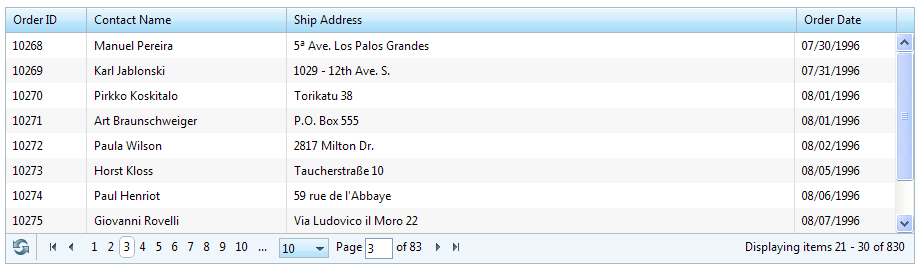
Telerik has ASP.NET MVC extensions which I think is free and cool. To get the Telerik paging working in my MVC application I install Telerik MVC Extension nuget using Visual Studio 2010 NuGet Package Manager. Then I configured the controller, view and off you go. I got something like this.

Telerik Paging Grid

Telerik Paging Grid

MvcPaging
MVCPaging is also another easy way to achieve paging. Install MvcPaging nugget using Visual Studio 2010 NuGet Package Manager. Download the source code for MvdPaging form github and see the sample in MvcPaging.Demo. I also found this article useful to understand MvcPaging.

MvcPaging

MvcPaging

MvcContrib
I did not end up accessing MvcContrib, because MvcPaging fit my requirements. Here is a nice article with source code if you are interested.

I end up using MvcPaging for my application as I needed to be able to display boxes of information and paging on the bottom of the webpage as shown in the MvcPaging image above. But if you have lot of data and need to show it in a grid Telerik is a great option too.

Please let me know if you find any other better solutions for paging.

Tagged with: , ,
Posted in MVC

Keep you MVC Razor view DRY!

Always keep your view DRY (do not repeat). Suppose your website has any of the following,

  • Top menu
  • Left menu
  • Right menu

Or you have some HTML which is repeated in different view, then you could use the following,

@Html.Partial(“ViewFile”)
Renders the “ViewFile” view to an MvcHtmlString. It follows the standard rules for view lookup (i.e. check current directory, then check the Shared directory).

@Html.RenderPartial(“ViewFile”)
Does the same as Html.Partial(), except that it writes its output directly to the response stream. This is more efficient, because the view content is not buffered in memory. However, because the method does not return any output, @Html.RenderPartial(“MyView”) won’t work. You have to wrap the call in a code block instead: @{Html.RenderPartial(“ViewFile”);}.

@RenderPage(“ViewFile.cshtml”)
Renders the specified view (identified by path and file name rather than by view name) directly to the response stream, like Html.RenderPartial(). However, it seems to always use the current view’s model as the model for “ViewFile.cshtml”.

I prefer using @RenderPage(“ViewFile.cshtml”) only because the syntax is easier and it is more readable. If you are using MVC Area RenderPage by default will look into the View and Shared folder of the Area. If you want to point it to the common View folder in the root, then you have to mention the path. See example below.

@RenderPage(“~/Views/Shared/ViewFile.cshtml”)

References,

Introducing “Razor” – a new view engine for ASP.NET

ASP.NET MVC 3: Layouts and Sections with Razor

Tagged with:
Posted in MVC