TechEd 2012, Australia

At TechEd 2012 this time it was all about Windows 8 and Windows Server 2012. As I am a developer, I attended all the Windows 8 sessions and the AppFest. It was a joy learning about Windows 8 and Metro (which is officially called Mordern UI Sytle) App development at #AppFest.

On Monday I flew early morning from Sydney to Gold cost and went straight to Gold Coast Convention Center for AppFest. The AppFest was hands-on coding time in the ultimate 24-hour hackathon for building Windows 8 apps, before TechEd kicked off. It was great fun and learning experience building an app for Legal Aid NSW office search. I developed this application overnight. Next day, I presented my app on a Samsung tablet with Windows 8 along with many others who did the same.

So this is happening #appfest starting

So this is happening #appfest starting. Photo by Nick Hodge

Read more ›

Posted in Windows 8

How to Install Windows 8 on a Mac Book Pro?

I have been using Mac Book Pro with Windows 7 on Boot Camp for a while now. Next week I am going to TechEd 2012, Gold Coast so it nearly time that I get Windows 8 ready for my Mac Book Pro. Following are my experience of installing Windows 8 on Mac Book Pro.

Prerequisite

  1. Windows 8 DVD with product key. I downloaded Windows 8 Enterprise x64  iso from MSDN. If you do not have MSDN subscription, than download the free trial http://windows.microsoft.com/en-AU/windows-8/download. Write down the product key to activate later.
  2. Mac book pro with Lion operating system.
  3. You would also need some special screw drivers to open up the mac if you are adding a new SSD to your Mac Book Pro. (Optional)

How to

  1. I decided to replace the existing hard disk with a solid state hard disk (OCZ 2.5″). It cost me $185.  Then I installed Mac Snow Leopard OS from DVD, because I didn’t have a copy of Mac Lion OS. Then I upgraded to Mac Lion OS. This time I kept a copy of Mac Lion OS. Skip this step if you are not replacing hard disk of your Mac Book Pro.
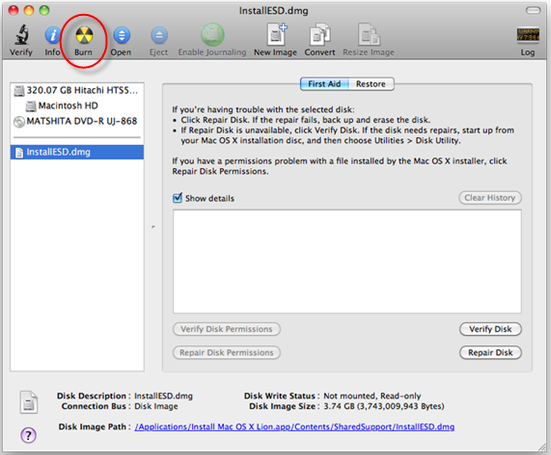
  2.  Burn Windows 8 iso to DVD using Mac Disk Utility with lowest speed. If you do not burn the DVD using Disk Utility, then you will get an error in next step while installing.

    Mac Disk Utility

    Mac Disk Utility

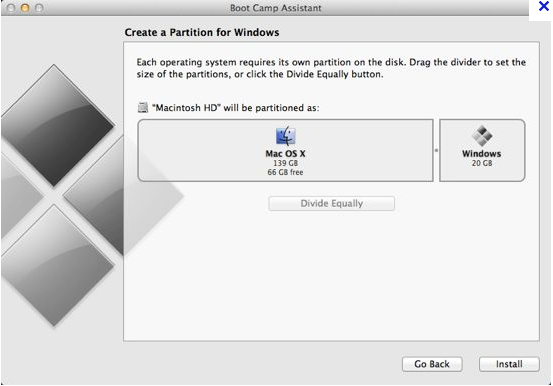
  3. Insert the windows 8 DVD into you Mac Book Pro. Open Mac Boot Camp Assistance and follow the prompt. Create partition for Windows and hit install button. You can also download the Boot Camp Support for Windows from the Boot Camp Assistant start screen and store it some where to install it later on Windows 8.

    Mac Boot Camp Assistance

    Mac Boot Camp Assistance

  4. Select custom option.
  5. Format the selected drive to NTFS for Windows 8.
  6. The installation will take about 30 minutes and during this time the Mac book pro will boot up several times. Hold the ‘option’ button and select Windows to boot to Windows
  7. If you are first time Windows 8 user I recommend you to watch this videos.
  8. Now that you are bit familier with Windows 8 open command prompt with as administrator and run the following command with the correct product key to activate windows,
    slmgr.vbs -12345-12345-12345-12345-1234
    slmgr.vbs -ato
    

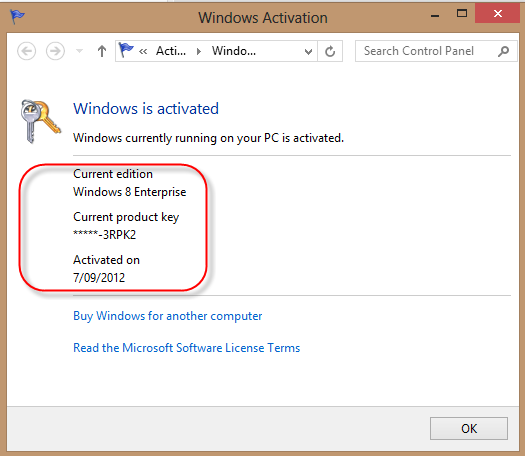
    Go Windows Activation and you should see the screen below,

    Windows 8 Activation Screen

    Windows 8 Activation Screen

  9. Install Boot Camp Support package on Windows 8 which you saved somewhere in step 3. This will install all the necessary drivers for Mac Book Pro hardware. Open Boot Camp Control Panel from the Windows 8 system tray and select the following to user the track pad properly.

    Windows 8 Boot Camp Control Panel

    Windows 8 Boot Camp Control Panel

  10. Good luck.

Issues

  1. Windows 8 freeze up and I have to press the power button for few second to do a hard reboot . I have done the following to resolve it.
    •  Open CMD from (Bootcamp (C)/Windows/System32/CMD)
    • Run CMD as administration
    • Type bcdedit /set disabledynamictick yes in CMD, and
    • Restart your MAC
    • Also enabling Hyer-V made it stable and strongly recommended.
      Windows 8 install HyperV
  2. Right click on Mac Book Pro trackpad is not working. I a using a wireless mouse for right click. To resolve it follow step 9.

References

https://discussions.apple.com/thread/4007397?start=75&tstart=0

Tagged with:
Posted in Mac Book Pro, Windows 8

Why use ASP.NET MVC instead of Web Forms?

I have been asked this question so many times.  Why use ASP.NET MVC instead of Web Forms?

My answer is simple, because it’s better. If you are not convinced please see below,

ASP.NET MVC is a completely new framework for building ASP.NET applications, designed from the ground up with SoC and testability in mind.

http://msdn.microsoft.com/en-us/magazine/dd942833.aspx

There are various positive points to moving towards MVC

1. TDD support out of the box as most of the design is based on interfaces.
2. SEO friendly URL by design (though now this is possible in ASP.NET 4 as well)
3. No ViewState (this may seem a bit of moving backward to some), but overall a good design decision.
4. Clean View Markup (no additional HTML emitted)
5. 100% extensible. You can add your own controller with IOC, switch view engines at will, control model binding at wish etc.
6. Rich UI support (possible through client side JS libraries like jQuery UI and others). Telerik has released some controls for MVC which includes Grid control as well (which are merely HTMLHelpers)
7. Session, JS, Ajax works. Validation is even more powerful with DataAnnotations and jquery.
8. Is MVC faster? Yes by default because of lack of viewstate and clean markup. But performance is subject and MVC by design is more performant that traditional ASP.NET webforms (though webforms can be made as fast as required.
9. Out of the box support for mitigating antiforgery attacks and XSS vulnerability (though asp.net does has this to some extent)
10. Out of the box minimal IOC support.
11. Full control over rendered HTML
12. Pluggable architecture

http://www.dofactory.com/topic/1336/why-should-we-use-mvc.aspx

Control over HTML enables developers to build Ajax applications more comfortably, and it facilitates adding more interactivity and responsiveness to existing apps. Direct control over HTML also means better accessibility for implementing compliance with evolving Web standards. The world of Web continually progresses, and ASP.NET MVC is closer than Web Forms to all emerging technology trends.

In addition, ASP.NET MVC uses interface-based contracts, which allow components to be more easily tested in isolation. As a result, cleaner and more testable code is often promoted as a good reason to embrace ASP.NET MVC. Frankly, I don’t consider this a valid primary reason for its selection. Writing clean code should be a practice that transcends the technology. While it can’t be denied that ASP.NET MVC is an inherently more testable framework, testability is more about isolating critical portions of code to gain visibility over internal state and control over input — two factors critical to attain the needed modularity. This practice has more to do with clean design and thoughtful code than with the surrounding framework. Put another way, your chances of writing bad code are nearly the same in Web Forms and ASP.NET MVC. But if you write bad code, MVC will make it easier to diagnose.

http://www.drdobbs.com/windows/231002811

An experienced developer will find MVC intuitive and easier to develop but a developer who has mainly worked in building websites and does not have software engineering skills might find MVC daunting and confusing especially after using regular asp.net for a while.

http://techkn0w.wordpress.com/2008/05/15/mvc-vs-regular-aspnet

Many of VB 6.0 developers had moved to ASP.net web development without knowing the basics of HTTP and web. For simulating windows form model development experience, webforms introduced event-driven approach and also introduced Viewstate and Postback.

http://weblogs.asp.net/shijuvarghese/archive/2008/07/09/asp-net-mvc-vs-asp-net-web-form.aspx

@ericphan from SSW has put a nice presentation on http://r.ssw.com/mvc-whats-all-the-fuss

Posted in ASP.NET, C#, MVC